
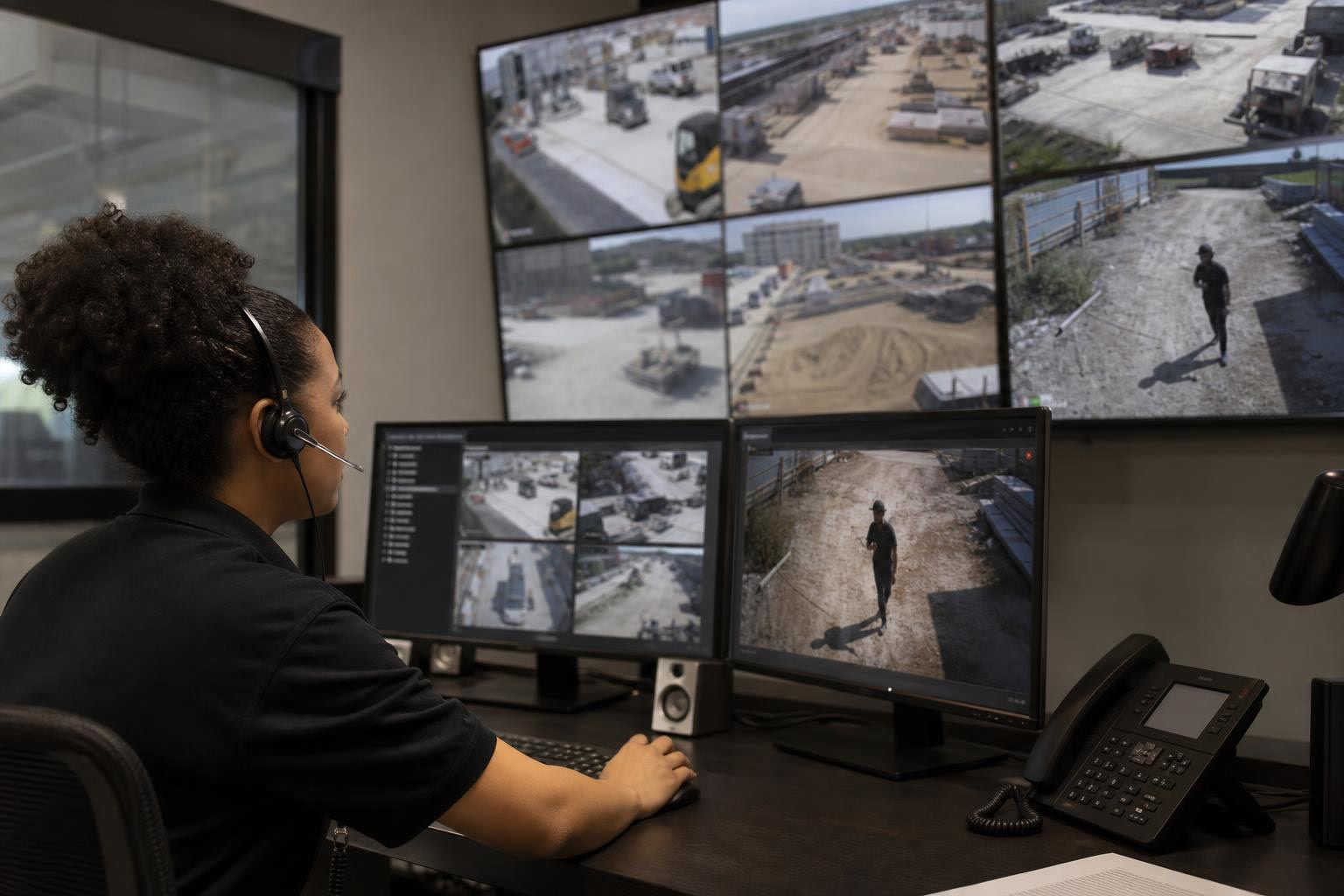
OnsiteView Protect is a human-reviewed monitoring add-on starting at $395/month that turns construction cameras from passive recording devices into active security systems. The workflow moves from motion detection to human verification to talk-down speaker engagement to police dispatch, all within minutes. Compared to security guards costing $7,200+ per month for a single overnight shift, Protect offers a fraction of the cost with faster, video-verified response times.
OnsiteView Protect is a monitoring add-on for OnsiteView construction cameras that adds human-reviewed escalation and response to the motion detection capabilities already built into the camera hardware. Instead of simply recording footage for later review, Protect creates a live link between your jobsite cameras and a monitoring center staffed by trained security professionals.
The system follows a defined workflow: cameras detect motion in designated zones, the monitoring center reviews the alert in real time, operators can address intruders through a talk-down speaker, and if the situation demands it, the team escalates to your site contacts or local authorities with video-verified details.
Understanding OnsiteView Protect escalation and response pricing and workflow matters because the gap between “we have cameras” and “we have cameras that actually stop theft” is where most construction losses happen. This glossary breaks down each component, from escalation to response to pricing, so you know exactly what the service does and what it costs.
In the context of construction site security, escalation is the process of raising an alert from initial detection to progressively higher levels of response. It is not a single action. It is a chain of decisions, each one triggered by the outcome of the step before it.
Think of it this way: a camera detects motion. That’s detection, not escalation. Escalation begins when a human reviews that motion alert and determines it requires action, then takes that action, then takes the next action if the first one fails.
The OnsiteView Protect escalation and response workflow follows a structured sequence:
Motion detection triggers an alert. The camera’s built-in motion detection identifies movement in a defined zone during monitored hours.
A monitoring center operator reviews the clip. This is the critical human review step. The operator determines whether the alert represents a real threat (an intruder) or a false trigger (wind, animals, authorized personnel).
If the threat is real, the operator activates the talk-down speaker. This is the first escalation point. The intruder hears a live voice warning them they are being watched and recorded.
If the intruder doesn’t leave, the operator follows the pre-set escalation plan. This might mean calling the site superintendent, the project owner, local police, or all three, in whatever order the client has configured.
The key word in that last step is “pre-set.” OnsiteView Protect escalation plans are configurable per site. You decide who gets called, in what order, and for what severity of incident. This is not a one-size-fits-all call tree.
One of the most common failures in construction security is not the hardware or the monitoring. It’s the plan. Or rather, the lack of one.
Industry security analysts consistently point out that failing to establish clear contact hierarchies before incidents occur means delayed notification chains, which allow theft to progress unchallenged. If your monitoring center doesn’t know who to call at 2 AM on a Saturday, minutes pass. Those minutes are the difference between a deterred intruder and a stolen excavator.
The setup process for OnsiteView Protect should include defining your escalation contacts, their phone numbers, the order of contact, and any special instructions (for example, “always call police first for this site because it’s in a high-crime area”).
According to data from Vision Detection Systems, the standard monitored escalation timeline looks like this:
Initial detection: 0 to 30 seconds
Human verification: 30 to 90 seconds
Escalation response: 1 to 3 minutes
That entire sequence, from a camera seeing something to a human taking action, happens in under three minutes. Compare that to a camera-only setup where footage sits on a hard drive until someone reviews it the next morning.
Response is the action taken once a verified threat has been confirmed. Detection tells you something is happening. Escalation moves the alert up the chain. Response is what actually happens to stop the threat.
In the OnsiteView Protect escalation and response pricing and workflow model, response takes three forms:
Talk-down via speaker. The monitoring operator speaks directly to the intruder through the camera’s built-in speaker. This is surprisingly effective. An intruder who thinks they’re alone and suddenly hears a voice saying “You are being recorded, leave the premises immediately” will often comply.
Notification to site contacts. The operator calls your designated contacts per the escalation plan.
Dispatch coordination with local authorities. The operator contacts police with video-verified details: number of intruders, location on site, what they’re doing, and what they look like.
Automated motion alerts are noise. Anyone who has managed a construction camera knows this. Wind blows a tarp, a raccoon crosses the frame, headlights sweep across the site, and your phone buzzes at 3 AM. After a few weeks of false alarms, most people turn off notifications entirely.
Human review eliminates this problem. A trained operator can distinguish between a deer and a person in seconds. This matters for two reasons beyond convenience.
First, many municipalities now impose fines for false alarm notifications to police. Human verification before escalation protects you from those penalties and ensures that when your monitoring center does call police, the call is taken seriously.
Second, sites with active monitoring systems experience 60% fewer successful theft incidents compared to camera-only installations, according to data cited from the Insurance Information Institute. The difference isn’t the camera. It’s the response.
Here’s something most people don’t realize about calling 911 for a triggered alarm: police departments treat unverified alarms as low priority. They’ve responded to too many false alarms. An unverified alarm might get a patrol car in 8 to 15 minutes, if one is available.
A video-verified dispatch is completely different. When a live operator tells police “two intruders are currently at the south fence, I have them on camera, they are loading materials into a white pickup truck,” that call gets priority. Response windows can drop to under 30 seconds for initial dispatch because police know a crime is actively in progress, not just a triggered sensor.
This is the single biggest advantage of the OnsiteView Protect response model over camera-only systems or even automated alarm systems.
OnsiteView Protect monitoring starts at $395 per month. This is an add-on to the monthly camera service fee, which ranges from $260 to $425 depending on the camera model.
That $395/month includes:
Human monitoring of motion detection alerts during defined hours
Talk-down speaker capability for live verbal warnings
Escalation coordination with your designated contacts and local authorities
Incident documentation and reporting
For full details on camera hardware and service pricing, see the OnsiteView pricing page.
Monitored construction camera services across the industry generally range from $200 to $800 per month per camera location. OnsiteView’s $395/month starting price sits in the middle of that range while including talk-down capability and configurable escalation, features that not all competitors bundle at similar price points.
One thing worth noting: OnsiteView publishes its Protect pricing on its website. Most competitors in this space (EarthCam, OxBlue, Sensera, Multivista) require a custom quote, which makes direct comparison difficult for buyers doing research.
The more useful pricing comparison isn’t against other monitoring services. It’s against the alternative most construction companies default to: security guards.
An unarmed security guard working an 8-hour overnight shift at roughly $30/hour costs about $240 per night, which works out to approximately $7,200 per month. That’s one guard, one shift, at one location. Armed guards cost more. Multiple shifts or locations multiply the expense quickly. Annual guard costs for a single site easily exceed $150,000.
Companies that switch from guard services to live video monitoring regularly report savings of 60% to 90% compared to their previous security spend. A site costing $12,000 per month in guard fees might achieve equal or better protection for $2,000 to $4,000 per month with a monitored camera system.
The National Equipment Register estimates that the average cost of a single instance of construction equipment theft is around $30,000. The recovery rate for stolen construction equipment sits below 25%, meaning three out of four stolen items are gone permanently.
One prevented theft at that average covers more than six years of OnsiteView Protect monitoring costs. Even a smaller theft of tools or materials, which typically runs $6,000 or more, pays for over a year of the service.
Beyond direct theft costs, construction theft causes project delays averaging $10,000 per day. Theft also adds an estimated 1% to 5% to overall project costs when you factor in replacement procurement, schedule impacts, and insurance premium increases.
Understanding the complete OnsiteView Protect escalation and response workflow from trigger to resolution clarifies what you’re paying for and how the service operates in practice.
During your designated monitoring window (typically after-hours, when theft risk peaks), the camera’s motion detection identifies movement. The camera generates a motion clip and transmits it to the monitoring center via Verizon LTE cellular connectivity. No site internet is required.
The monitoring center receives the alert in real time. This is not a batch review process. Clips are reviewed as they arrive.
A trained operator watches the clip and makes a determination:
Benign trigger (animal, weather, authorized person, headlights): The event is logged. No action taken. No unnecessary calls to your phone.
Suspicious activity (person on site, movement near equipment or materials): The operator moves to Step 4.
The operator uses the camera’s built-in talk-down speaker to address the intruder directly. The message is live, not a recording. The intruder hears a human voice telling them they are being watched and recorded, and that they need to leave immediately.
Many intrusions end here. The psychological impact of being directly addressed by a disembodied voice in the dark, knowing you’re on camera, is a powerful deterrent.
If the intruder does not comply, the operator follows the escalation plan configured for that specific site. This might include:
Calling the site superintendent
Calling the project owner or general contractor
Contacting local police with video-verified details
Any combination of the above, in whatever order the client has specified
When police are called, the operator provides specific, real-time information: how many intruders, where on the site, what they’re doing, physical descriptions, vehicle details. This transforms the call from a generic alarm notification into an actionable crime-in-progress report.
After the event, the client receives documentation of what happened, including the motion clip, timestamps, actions taken, and outcomes. This documentation is valuable for insurance claims, police reports, and internal security reviews.
OnsiteView Protect is compatible with all OnsiteView camera models, including the 4K Static camera, the Standard PTZ camera, and the 4K Ultra HD PTZ camera.
For sites without reliable power, the solar power kit (starting at $3,995 plus shipping) provides 24/7 operation so that monitoring coverage doesn’t depend on the electrical grid being ready.
A camera that only records gives you documentation of what was stolen. It does not prevent the theft.
This is the fundamental gap that the OnsiteView Protect escalation and response workflow closes. The space between detection and response is where losses happen. A camera sees someone cutting a fence at 1 AM. If nobody reviews that footage until 7 AM, the intruder had six hours. If a monitoring center reviews it within 90 seconds, the intruder had less than two minutes before a voice told them to leave.
Construction theft costs the U.S. construction industry an estimated $1 billion annually. Only about 25% of companies have dedicated on-site security. The remaining 75% rely on cameras, fences, and hope, a combination that fails when organized thieves show up with a flatbed trailer at 2 AM.
Insurance carriers are increasingly recognizing the difference between cameras and monitored cameras. Sites with verified monitoring systems can qualify for 5% to 15% premium reductions because monitored sites have lower loss rates and better claims documentation. Some policies now explicitly require real-time monitoring as a condition of coverage for high-value sites.
The monitoring workflow also provides the kind of documentation that makes claims processing smoother: timestamped video of the incident, records of the response actions taken, and proof that reasonable security measures were in place.
Several companies offer monitored construction camera services. Here’s how the workflows compare at a high level.
TrueLook uses a UL-Listed, Five Diamond Certified monitoring center. When motion is detected in selected zones after hours, their team reviews footage. When a threat is verified, they notify the primary contact, who then decides whether to request emergency services.
EarthCam’s Command Watch24 includes talk-down capabilities and a deterrent strobe. Alerts go to their Central Station Monitoring team for verification and response.
SentraCam engages intruders via amplified loudspeakers and coordinates with authorities if the issue escalates.
OnsiteView Protect follows a similar core workflow (detect, verify, talk-down, escalate) but differentiates on two fronts: transparent published pricing ($395/month starting, while competitors require custom quotes) and configurable escalation plans that let each site define its own contact hierarchy and response procedures.
OnsiteView also holds Texas Department of Public Safety private security license #B13228, signaling regulatory compliance for monitored security services.
Adding Protect to your OnsiteView camera setup involves selecting your camera model, defining your monitoring windows and escalation contacts, and activating the add-on service.
If you’re still evaluating, OnsiteView offers interactive demo cameras that let you test-drive the PTZ, 4K PTZ, and 4K Static models before committing. You can also explore client case studies to see how other contractors have deployed the system.
Ready to get pricing for your specific project? Request a free camera quote to get started.
OnsiteView Protect monitoring starts at $395 per month, added on top of your camera’s monthly service fee (which ranges from $260 to $425 depending on the model). This includes human monitoring of motion alerts, talk-down speaker capability, escalation coordination, and incident documentation.
Industry benchmarks for professional monitoring put initial detection at 0 to 30 seconds, human verification at 30 to 90 seconds, and escalation response at 1 to 3 minutes. The entire sequence from motion trigger to active response typically completes in under three minutes.
Yes. OnsiteView cameras use Verizon LTE cellular connectivity, so no site internet is needed. For sites without reliable power, OnsiteView offers a solar power kit starting at $3,995 that provides 24/7 camera operation.
The monitoring center operator reviews every alert before taking action. If the trigger is benign, it gets logged and dismissed. No calls to your phone, no dispatch to police, no municipal false alarm fines. This human review layer is one of the primary advantages over automated alarm systems.
Yes. OnsiteView Protect escalation plans are configurable per site. You define the contact hierarchy, the order of calls, and any special instructions. This should be set up before monitoring begins so the team knows exactly what to do during an incident.
All three OnsiteView camera models support the Protect add-on: the 4K Static camera, the Standard PTZ camera, and the 4K Ultra HD PTZ camera.
Significantly. A single unarmed guard working one overnight shift costs roughly $7,200 per month. OnsiteView Protect starts at $395 per month and provides coverage without the limitations of a single person at a single location. Companies switching from guards to monitored cameras commonly report 60% to 90% savings.
It can. Insurance carriers increasingly offer 5% to 15% premium reductions for sites with verified monitoring systems. The incident documentation that Protect provides also supports faster, smoother claims processing if a loss does occur.